
Cloud CLI (aka Claude Code UI)
A desktop and mobile UI for [Claude Code](https://docs.anthropic.com/en/docs/claude-code), [Cursor CLI](https://docs.cursor.com/en/cli/overview), [Codex](https://developers.openai.com/codex), and [Gemini-CLI](https://geminicli.com/). You can use it locally or remotely to view your active projects and sessions and make changes to them from everywhere (mobile or desktop). This gives you a proper interface that works everywhere.
CloudCLI Cloud · Discord · Bug Reports · Contributing


## Screenshots
Desktop View

Main interface showing project overview and chat
|
Mobile Experience

Responsive mobile design with touch navigation
|
CLI Selection
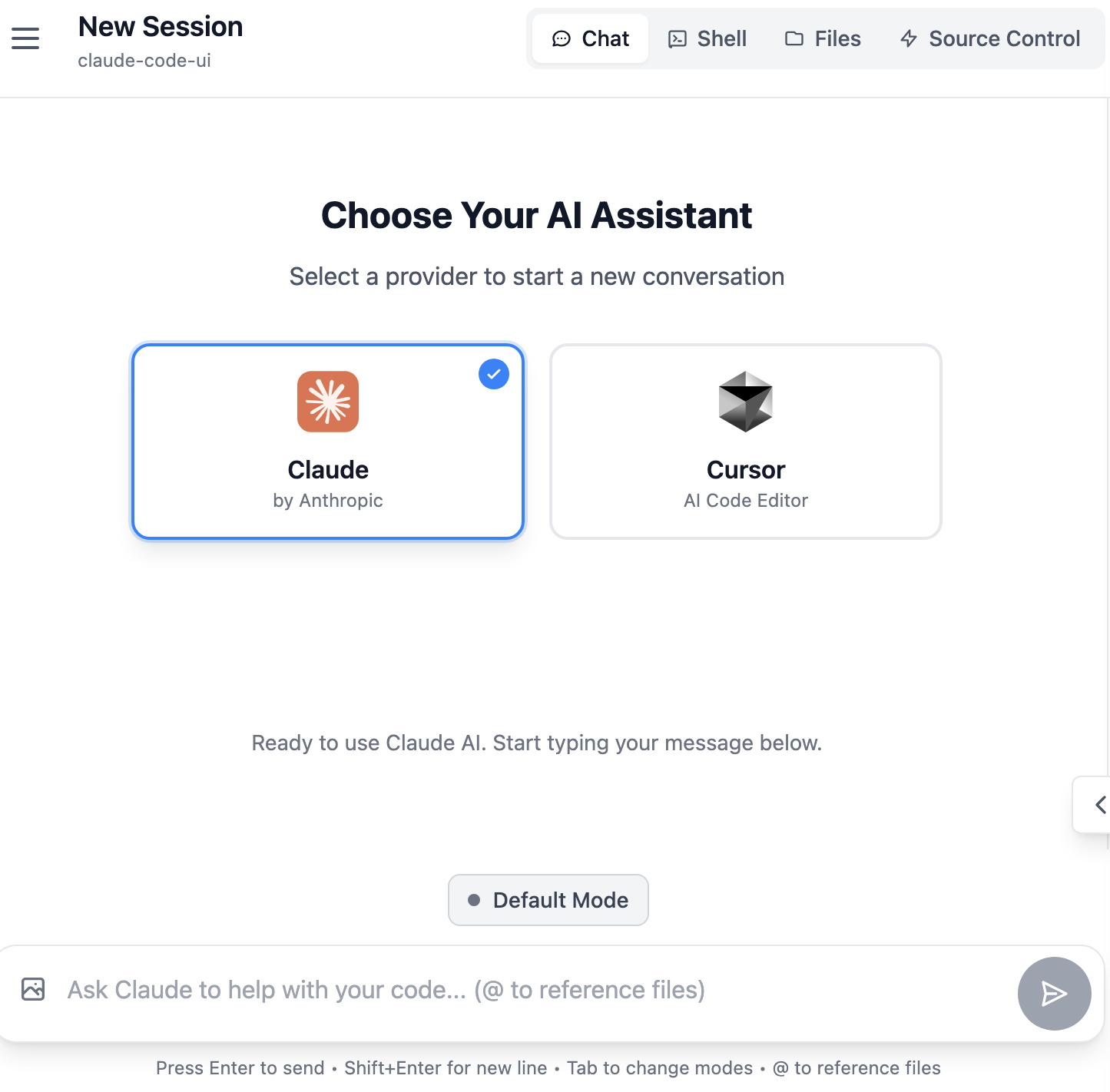
Select between Claude Code, Cursor CLI and Codex
|
## Features
- **Responsive Design** - Works seamlessly across desktop, tablet, and mobile so you can also use Agents from mobile
- **Interactive Chat Interface** - Built-in chat interface for seamless communication with the Agents
- **Integrated Shell Terminal** - Direct access to the Agents CLI through built-in shell functionality
- **File Explorer** - Interactive file tree with syntax highlighting and live editing
- **Git Explorer** - View, stage and commit your changes. You can also switch branches
- **Session Management** - Resume conversations, manage multiple sessions, and track history
- **TaskMaster AI Integration** *(Optional)* - Advanced project management with AI-powered task planning, PRD parsing, and workflow automation
- **Model Compatibility** - Works with Claude Sonnet 4.5, Opus 4.5, GPT-5.2, and Gemini.
## Quick Start
### CloudCLI Cloud (Recommended)
The fastest way to get started — no local setup required. Get a fully managed, containerized development environment accessible from the web, mobile app, API, or your favorite IDE.
**[Get started with CloudCLI Cloud](https://cloudcli.ai)**
### Self-Hosted (Open Source)
#### Prerequisites
- [Node.js](https://nodejs.org/) v22 or higher
- [Claude Code CLI](https://docs.anthropic.com/en/docs/claude-code) installed and configured, and/or
- [Cursor CLI](https://docs.cursor.com/en/cli/overview) installed and configured, and/or
- [Codex](https://developers.openai.com/codex) installed and configured, and/or
- [Gemini-CLI](https://geminicli.com/) installed and configured
#### One-click Operation
No installation required, direct operation:
```bash
npx @siteboon/claude-code-ui
```
The server will start and be accessible at `http://localhost:3001` (or your configured PORT).
**To restart**: Simply run the same `npx` command again after stopping the server
### Global Installation (For Regular Use)
For frequent use, install globally once:
```bash
npm install -g @siteboon/claude-code-ui
```
Then start with a simple command:
```bash
claude-code-ui
```
**To restart**: Stop with Ctrl+C and run `claude-code-ui` again.
**To update**:
```bash
cloudcli update
```
### CLI Usage
After global installation, you have access to both `claude-code-ui` and `cloudcli` commands:
| Command / Option | Short | Description |
|------------------|-------|-------------|
| `cloudcli` or `claude-code-ui` | | Start the server (default) |
| `cloudcli start` | | Start the server explicitly |
| `cloudcli status` | | Show configuration and data locations |
| `cloudcli update` | | Update to the latest version |
| `cloudcli help` | | Show help information |
| `cloudcli version` | | Show version information |
| `--port ` | `-p` | Set server port (default: 3001) |
| `--database-path ` | | Set custom database location |
**Examples:**
```bash
cloudcli # Start with defaults
cloudcli -p 8080 # Start on custom port
cloudcli status # Show current configuration
```
### Run as Background Service (Recommended for Production)
For production use, run CloudCLI as a background service using PM2 (Process Manager 2):
#### Install PM2
```bash
npm install -g pm2
```
#### Start as Background Service
```bash
# Start the server in background
pm2 start claude-code-ui --name "claude-code-ui"
# Or using the shorter alias
pm2 start cloudcli --name "claude-code-ui"
# Start on a custom port
pm2 start cloudcli --name "claude-code-ui" -- --port 8080
```
#### Auto-Start on System Boot
To make CloudCLI UI start automatically when your system boots:
```bash
# Generate startup script for your platform
pm2 startup
# Save current process list
pm2 save
```
### Local Development Installation
1. **Clone the repository:**
```bash
git clone https://github.com/siteboon/claudecodeui.git
cd claudecodeui
```
2. **Install dependencies:**
```bash
npm install
```
3. **Configure environment:**
```bash
cp .env.example .env
# Edit .env with your preferred settings
```
4. **Start the application:**
```bash
# Development mode (with hot reload)
npm run dev
```
The application will start at the port you specified in your .env
5. **Open your browser:**
- Development: `http://localhost:3001`
## Security & Tools Configuration
**🔒 Important Notice**: All Claude Code tools are **disabled by default**. This prevents potentially harmful operations from running automatically.
### Enabling Tools
To use Claude Code's full functionality, you'll need to manually enable tools:
1. **Open Tools Settings** - Click the gear icon in the sidebar
3. **Enable Selectively** - Turn on only the tools you need
4. **Apply Settings** - Your preferences are saved locally

*Tools Settings interface - enable only what you need*
**Recommended approach**: Start with basic tools enabled and add more as needed. You can always adjust these settings later.
## TaskMaster AI Integration *(Optional)*
CloudCLI UI supports **[TaskMaster AI](https://github.com/eyaltoledano/claude-task-master)** (aka claude-task-master) integration for advanced project management and AI-powered task planning.
It provides
- AI-powered task generation from PRDs (Product Requirements Documents)
- Smart task breakdown and dependency management
- Visual task boards and progress tracking
**Setup & Documentation**: Visit the [TaskMaster AI GitHub repository](https://github.com/eyaltoledano/claude-task-master) for installation instructions, configuration guides, and usage examples.
After installing it you should be able to enable it from the Settings
## Usage Guide
### Core Features
#### Project Management
It automatically discovers Claude Code, Cursor or Codex sessions when available and groups them together into projects
session counts
- **Project Actions** - Rename, delete, and organize projects
- **Smart Navigation** - Quick access to recent projects and sessions
- **MCP support** - Add your own MCP servers through the UI
#### Chat Interface
- **Use responsive chat or Claude Code/Cursor CLI/Codex CLI** - You can either use the adapted chat interface or use the shell button to connect to your selected CLI.
- **Real-time Communication** - Stream responses from your selected CLI (Claude Code/Cursor/Codex) with WebSocket connection
- **Session Management** - Resume previous conversations or start fresh sessions
- **Message History** - Complete conversation history with timestamps and metadata
- **Multi-format Support** - Text, code blocks, and file references
#### File Explorer & Editor
- **Interactive File Tree** - Browse project structure with expand/collapse navigation
- **Live File Editing** - Read, modify, and save files directly in the interface
- **Syntax Highlighting** - Support for multiple programming languages
- **File Operations** - Create, rename, delete files and directories
#### Git Explorer
#### TaskMaster AI Integration *(Optional)*
- **Visual Task Board** - Kanban-style interface for managing development tasks
- **PRD Parser** - Create Product Requirements Documents and parse them into structured tasks
- **Progress Tracking** - Real-time status updates and completion tracking
#### Session Management
- **Session Persistence** - All conversations automatically saved
- **Session Organization** - Group sessions by project and timestamp
- **Session Actions** - Rename, delete, and export conversation history
- **Cross-device Sync** - Access sessions from any device
### Mobile App
- **Responsive Design** - Optimized for all screen sizes
- **Touch-friendly Interface** - Swipe gestures and touch navigation
- **Mobile Navigation** - Bottom tab bar for easy thumb navigation
- **Adaptive Layout** - Collapsible sidebar and smart content prioritization
- **Add shortcut to Home Screen** - Add a shortcut to your home screen and the app will behave like a PWA
## Architecture
### System Overview
```
┌─────────────────┐ ┌─────────────────┐ ┌─────────────────┐
│ Frontend │ │ Backend │ │ Agent │
│ (React/Vite) │◄──►│ (Express/WS) │◄──►│ Integration │
│ │ │ │ │ │
└─────────────────┘ └─────────────────┘ └─────────────────┘
```
### Backend (Node.js + Express)
- **Express Server** - RESTful API with static file serving
- **WebSocket Server** - Communication for chats and project refresh
- **Agent Integration (Claude Code / Cursor CLI / Codex / Gemini CLI)** - Process spawning and management
- **File System API** - Exposing file browser for projects
### Frontend (React + Vite)
- **React 18** - Modern component architecture with hooks
- **CodeMirror** - Advanced code editor with syntax highlighting
### Contributing
We welcome contributions! Please see our [Contributing Guide](CONTRIBUTING.md) for details on commit conventions, development workflow, and release process.
## Troubleshooting
### Common Issues & Solutions
#### "No Claude projects found"
**Problem**: The UI shows no projects or empty project list
**Solutions**:
- Ensure [Claude Code](https://docs.anthropic.com/en/docs/claude-code) is properly installed
- Run `claude` command in at least one project directory to initialize
- Verify `~/.claude/projects/` directory exists and has proper permissions
#### File Explorer Issues
**Problem**: Files not loading, permission errors, empty directories
**Solutions**:
- Check project directory permissions (`ls -la` in terminal)
- Verify the project path exists and is accessible
- Review server console logs for detailed error messages
- Ensure you're not trying to access system directories outside project scope
## License
GNU General Public License v3.0 - see [LICENSE](LICENSE) file for details.
This project is open source and free to use, modify, and distribute under the GPL v3 license.
## Acknowledgments
### Built With
- **[Claude Code](https://docs.anthropic.com/en/docs/claude-code)** - Anthropic's official CLI
- **[Cursor CLI](https://docs.cursor.com/en/cli/overview)** - Cursor's official CLI
- **[Codex](https://developers.openai.com/codex)** - OpenAI Codex
- **[Gemini-CLI](https://geminicli.com/)** - Google Gemini CLI
- **[React](https://react.dev/)** - User interface library
- **[Vite](https://vitejs.dev/)** - Fast build tool and dev server
- **[Tailwind CSS](https://tailwindcss.com/)** - Utility-first CSS framework
- **[CodeMirror](https://codemirror.net/)** - Advanced code editor
- **[TaskMaster AI](https://github.com/eyaltoledano/claude-task-master)** *(Optional)* - AI-powered project management and task planning
## Support & Community
### Stay Updated
- **[Join our Discord](https://discord.gg/buxwujPNRE)** - Get help, share feedback, and connect with the community
- **[CloudCLI Cloud](https://cloudcli.ai)** - Try the hosted cloud version
- **Star** this repository to show support
- **Watch** for updates and new releases
- **Follow** the project for announcements
### Sponsors
- [Siteboon - AI powered website builder](https://siteboon.ai)
---
Made with care for the Claude Code, Cursor and Codex community.